Device Details
Overview
| Name | Version: | Push2Proxy 1.0 |
| Author: | xanadu |
| Device Type: | Audio Effect |
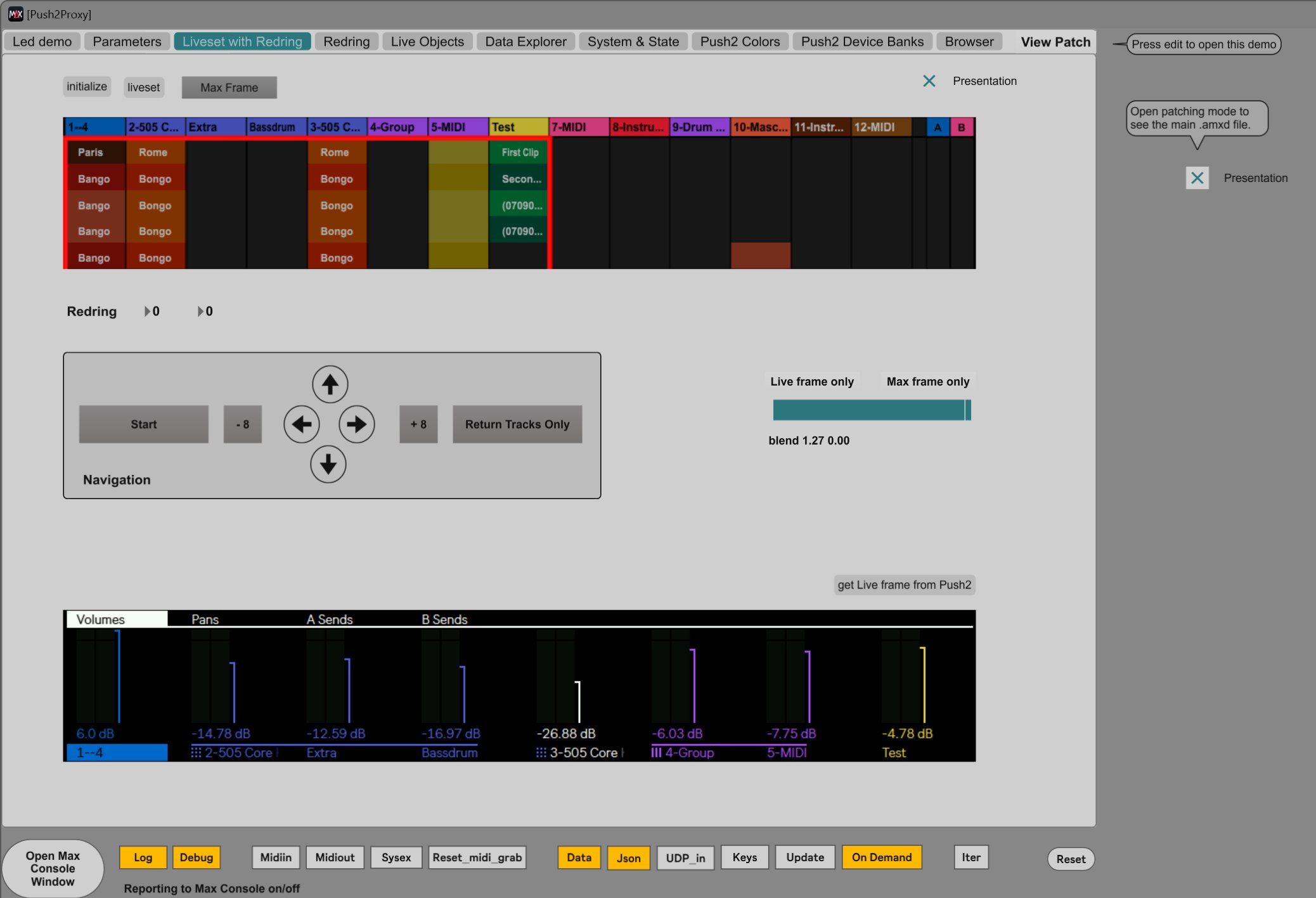
| Description: | Push2Proxy To get straight to the point: Push2Proxy is a component that allows you to fully take over the Ableton Push2 from Max in software, and indirectly also control Live. It does not do anything musical by itself. Windows only. All source code is included and open source, but the project consists of a mix of C++, Python, JavaScript and Max. So you need some familiarity with these languages to really work with it. On the other hand: if you have a bit of technical intuition, you can often use ChatGPT to help you. ChatGPT also contributed significantly to the codebase. Without it, this project would not have reached this level. That said, it also wouldn’t have worked without strict direction. The original motivation for this project was different. I was working on optimizing the Korg Electribe with the Hacktribe firmware. The device still feels modern, but eventually I ran into the physical limits of the hardware: limited interface, limited processing, and not much room to experiment further. Instead of pushing against those limits, I decided to move forward: Ableton Live + Push2, with Max in control. In that setup, many of the constraints of dedicated hardware disappear. In principle: the sky is the limit. The larger design goes under the codename Neoplay. The goal is to build a groovebox, but not just any groovebox. The sound engine is Ableton Live 12.2.5. Control is handled through Push2, and Max / MaxForLive makes it all work. The idea is that you no longer have to switch between Push2 and Live with mouse and keyboard. Everything is done on Push2, except typing names. The main Live screen can be turned off. Push2 becomes your instrument: no distractions, full focus on what you are doing. Push was originally designed as an extension of Live, and therefore had to support all of Live’s functionality. Neoplay turns that around. You make music on Push2, without mouse, without keyboard, and without Session or Arrangement View. Live provides the sound. Max makes it possible. Push2Proxy can be used both in Max for Live and in Max standalone. This mainly depends on how you want to work with Live. Max for Live has the advantage that everything is stored inside the Live set. Max standalone has the advantage that you can close and restart Live without software issues. Technically, the tight integration between Push2 and Live remains the foundation. On top of that, additional layers are introduced to bring Max in control: Libusb Proxy Max can take over the Push2 display. This can be full takeover or limited to rectangular regions. It can fully replace the display, or act as an overlay where Live’s screen is still partially visible. Push2Proxy A control layer is placed between Live and the Push2 control surface. All messages from Live to Push2 are intercepted and sent to Max. All MIDI bytes from Push2 to Live, and from Live to the Push2 LEDs, are also intercepted. You can choose to pass messages through unchanged, or “grab” them so they never reach their original destination. This allows you to take full control. For example, you can set LED colors and brightness yourself, or send MIDI messages from Max to Push2 and Live. Red Ring The position of the Push2 red ring is also intercepted. This allows you to know exactly which clips are inside the red ring. From Max you can trigger or stop clips, and you can also move the red ring yourself in small or larger steps. It took about six months to make all of this work. Developing the next stage — Neoplay itself — will likely take several more months. Still, this component is released as a standalone project for curious developers who want to see how this is implemented technically. A demo application is included with several components: LED Demo Shows the colors and behavior of the LEDs, buttons, and encoders on Push2. Parameters Displays current parameter values, including minimum and maximum. Liveset with Red Ring Displays the full Live set on the Push2 screen, including the red ring. The red ring can also be moved. During development it became clear that Live does not always display the red ring correctly with group tracks and chains. Clips within the Red Ring Designed for touchscreen use. Clips and scenes can be triggered or stopped directly. Live Objects Displays properties of the current Live objects relevant to Push2. Data Explorer Overview of retrievable data from Live, including the contents of received messages. System and State Central status of Push2 and related metadata. Push2 Colors Color tables used to convert color_index values to RGB for LEDs and the Push2 display. Push2 Device Banks The parameter banks used by Push2 for Live instruments and effects. Browser Tracks selections in the Live browser. In practice this component is quite confusing and offers too many options to be truly usable. For Neoplay, a simpler and more focused alternative will likely be developed. Even if you don’t plan to use Push2Proxy directly, the project may still be of interest. It contains quite a few hacks and technical solutions that might be useful or inspiring if you are working with Max. A design of this size inevitably contains shortcomings, mistakes, and bugs. If you find anything: leave a comment. It might be possible to fix it. |
Details
| Live Version Used: | 12.2.5 |
| Max Version Used: | 9.0.8 |
| Date Added: | Mar 26 2026 17:53:04 |
| Date Last Updated: | Mar 26 2026 18:06:47 |
| Downloads: | 0 |
| Website: | https://github.com/wjlageman/Push2Proxy/tree/main |
| ⓘ License: | AttributionNonCommercial |
Average Rating
Log in to rate this device |
-n/a- |
Login to comment on this device.
Browse the full library