Device Details
Overview
| Name | Version: | Augur Deluxe 1.0 |
| Author: | ijoaudio |
| Device Type: | MIDI Effect |
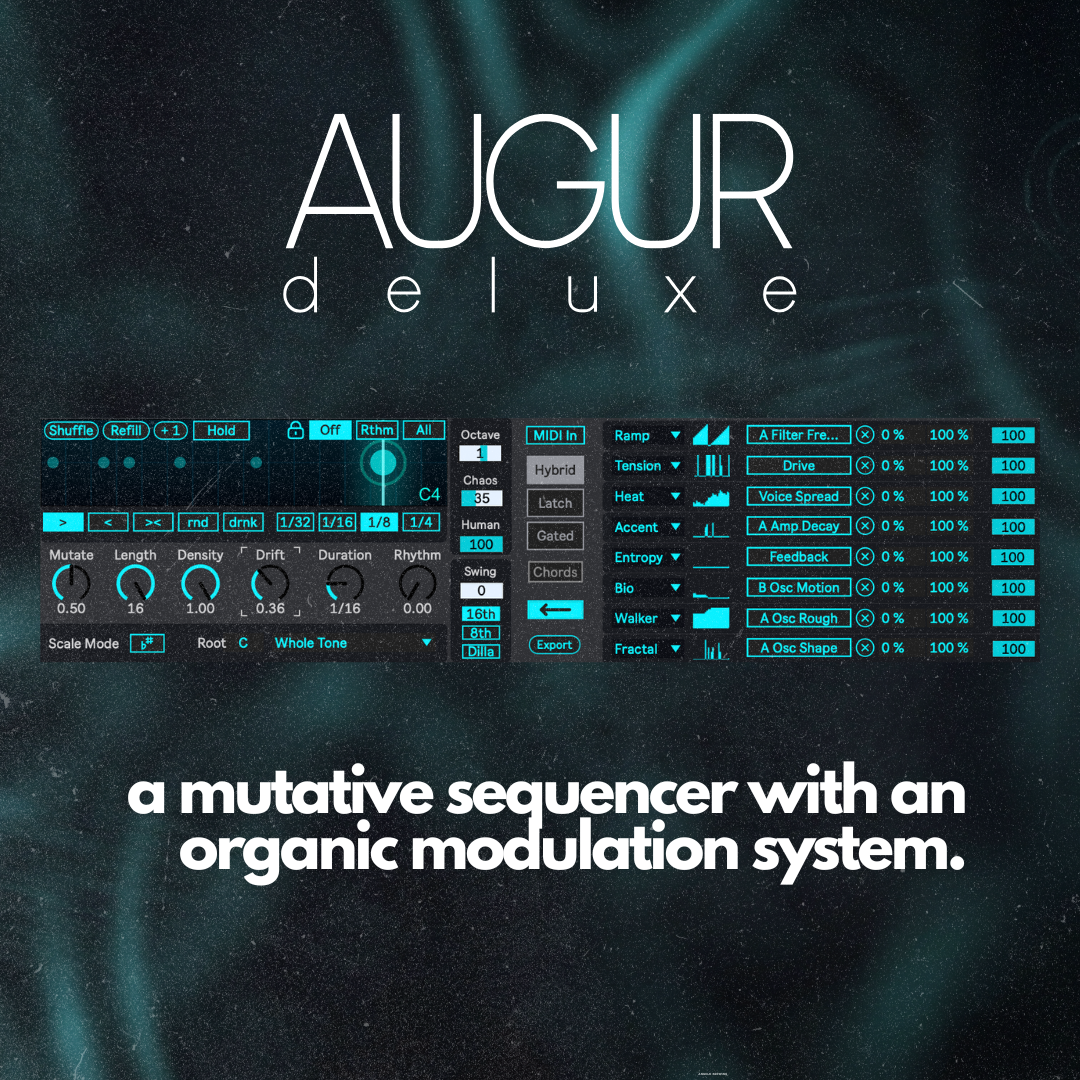
| Description: | We spend a lot of time dragging MIDI blocks around a grid, trying to force inspiration. But what if the melody you’re looking for already exists, and you just need a way to uncover it? Augur is my first device of 2026. At its core, it's a generative Max4Live sequencer inspired by the classic Eurorack Turing Machine. But rather than just spitting out random numbers, Augur acts as a musical physics engine. It generates a pattern, and then allows each step in that pattern to slowly mutate and evolve as it plays. You don't program Augur; you conduct it. Set the conditions: the scale, the density, the physics... and let Augur predict the future. The Generative Engine Mutation: The heartbeat of the device. Keep it at 0% for a locked, repeating sequence, or turn it up to watch notes, rhythms, and octaves organically shift over time. Density: Instead of randomly muting notes for a breakdown, Density acts as a threshold. Lower it, and the "weakest" notes die off first, leaving a sparse, minimal pulse. Raise it back up, and the exact same notes return. Locking: Find a rhythm you love but want a new melody? Engage "Rhythm Lock" and scramble the pitches while keeping the groove intact. The Soul: Physics-Based Modulation Standard LFOs are great, but they don't listen to the music. Augur features an 8-lane modulation matrix driven by the actual characteristics of your generated pattern. You can map these 8 "physics models" to any parameter in Live (like filter cutoff, wavetable position, or drive). Heat: Measures the "temperature" of your pattern. Dense, busy rolls increase the modulation value; sparse, empty spaces let it cool down. Tension: Measures how far a note is from the root of your scale. Root notes stay clean, while high, dissonant intervals output higher modulation values—perfect for driving a wavefolder or distortion unit. Entropy: Tracks loop repetition. If your pattern is locked, Entropy slowly rises over time, degrading the sound. The moment you mutate the pattern, Entropy resets to zero. ...plus 5 more algorithms (Ramp, Accent, Bio, Walker, and Fractal) that turn your melody's math into wandering, organic textures. Features at a Glance Plays Nicely with Others: Automatically syncs with Ableton Live 12's Global Scale mode. You can also route MIDI directly into Augur (via Hybrid, Latch, or Gated modes) to use your own chords as the seed for mutations, or force it to spit out full chords instead of single notes. MPC & Dilla Swing: Go beyond the grid with classic 16th and 8th note MPC-style swing, plus a dedicated "Dilla" algorithm for unquantized, deeply human timing. Polyrhythmic Sequencing: Break out of the 4/4 loop. Set custom sequence lengths (like 11 or 13 steps) to create shifting, mesmerizing polyrhythmic. "Drunk" Playback: Alongside standard forward, reverse, ping-pong, and random directions, the unique Drunk algorithm makes the playhead continuously stumble back and forth for unpredictable phrasing. Drift & Chaos: Non-destructively audition new melodic variations within your scale (Drift), or introduce randomized octave jumping (Chaos) to instantly turn a simple sequence into a complex, two-handed performance. Tactile Live Controls: Build sparse patterns naturally by injecting single notes with the +1 Button, freeze the sequencer for live stutters using Hold, or instantly spark new ideas with Shuffle and Refill. Humanized Velocity: Automatically scale and vary note velocities so your patterns feel played by a human, not drawn in with a mouse. A Quick Note on Push Support Augur has deep integration for Push 2 and 3. However, due to current Ableton API limitations, the actual mapping of the 8 modulators (clicking "Map" and selecting a parameter) must be done on your computer screen with a mouse. Once mapped, you can control the amounts and parameters directly from your Push. Because of this, Push 3 Standalone users will not be able to assign new modulation targets while separated from a computer. Requirements Augur is a Max for Live device, so you need to own a copy of Ableton Live Suite 11 or 12, or a copy of Ableton Live Standard with the Max add-on purchased. |
Details
| Live Version Used: | 12.3 |
| Max Version Used: | 9.0.1 |
| Date Added: | Mar 10 2026 16:04:25 |
| Date Last Updated: | Mar 10 2026 16:04:35 |
| Downloads: | 1 |
| Website: | https://ko-fi.com/s/e93ddbff46 |
| ⓘ License: | Commercial |
Average Rating
(1) Log in to rate this device |
5 |
Comments
Where is the video walk through of this device?
Posted on March 11 2026 by zeph |
Report Issue
@zeph: video walkthrough https://www.youtube.com/watch?v=n72V_LcCKM8
Posted on March 11 2026 by shufflemaster23 |
Report Issue
I’m a man of few words, but Augur is very impressive. Good, clean interface that seems really intuitive and enables production of good results within minutes. The simplicity of use belies the sounds generated. You’ll not get a chart topping hit, but you’ll be on your way.
Posted on March 12 2026 by anarchopx |
Report Issue
This is a smart, efficient, feature filled sequencer for people who love to have amost all the features a Live sequencer can provide.
Posted on March 23 2026 by Syn |
Report Issue
And it's like a generative sequencer of the Turing Machine category. Good alternative to the Euclidean things on Live or the classic 16 step multi pattern sequencers!
Posted on March 23 2026 by Syn |
Report Issue
Login to comment on this device.
Browse the full library