Device Details
Overview
| Name | Version: | SMOOTHEE SIDECHAIN by grzebien 1.2 |
| Author: | grzebien |
| Device Type: | Audio Effect |
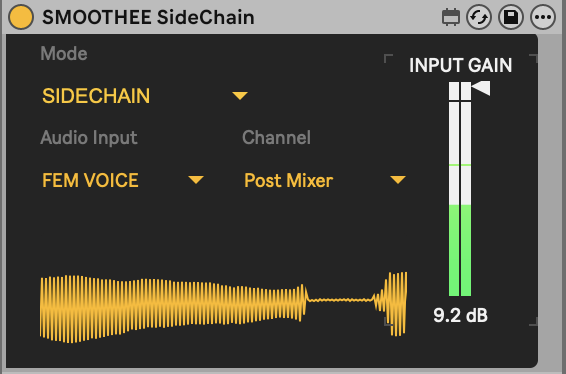
| Description: | External Audio Routing for Ableton Audio Effect Racks Function: A fast and precise audio injection module. It bypasses standard Ableton mixer limitations, allowing you to feed any signal from your project directly into your Rack. Key Features: * Total Control: Select any tap point (Pre FX, Post FX, Post Mixer) for every track in Ableton. * Hardware Ready: Supports external devices sidechaining, enabling you to route signals from analog hardware directly into your Rack chain. * Zero Latency: The device introduces no signal delay. * Ultra Lightweight: Extremely low CPU usage. * Visual Control: Built-in display (operating signal timeline) for real-time monitoring of the processed audio. Two Operating Modes: 1. NORMAL (Bypass): Transparent flow. Audio passes through without changes to the next effects in the chain. 2. SIDECHAIN (Injection): Replaces the original audio with the signal selected from the menu. Usage Instructions: Place the device anywhere in the Chain: 1. Use Mode Normal for standard signal flow. 2. Use Mode Sidechain to replace audio with an external signal – perfect for triggering compressors or gating effects via another track or external hardware. This device was created for the needs of SMOOTHEE by grzebien_ and is included in the set. https://grzebien.gumroad.com/l/ejggde Maybe someone will find it useful. |
Details
| Live Version Used: | 12.3.8 |
| Max Version Used: | 8.6.5 |
| Date Added: | May 01 2026 18:17:01 |
| Date Last Updated: | May 06 2026 12:46:59 |
| Downloads: | 191 |
| ⓘ License: | Attribution |
Average Rating
(1) Log in to rate this device |
5 |
Files
| Device File: | SMOOTHEE SideChain vs1.2.amxd |
Comments
Darn.....was really hoping this was Live 11 Suite compatible
Posted on May 02 2026 by irishmos |
Report Issue
@irishmos its not about ableton version its about max4live version you have. should work with live 11 suite if only You have at least Max 8.6 or higher.
Posted on May 02 2026 by grzebien |
Report Issue
I think it's Catalina 10.15 that's causing that gate
Posted on May 02 2026 by irishmos |
Report Issue
@irishmos download version 8.6 from here.
https://cycling74.com/downloads/older
Should work. Earlier versions missing live.routing obiect.
I checked on my high sierra OS version.
https://cycling74.com/downloads/older
Should work. Earlier versions missing live.routing obiect.
I checked on my high sierra OS version.
Posted on May 03 2026 by grzebien |
Report Issue
I'm on 8.6
Posted on May 03 2026 by irishmos |
Report Issue
Weirdly, it's working now. LOL. wtf??? :)
Posted on May 03 2026 by irishmos |
Report Issue
Ok it loads. I spoke to soon.
I can only change from Normal to Sidechain.
Routing isn't available to me. Oh well....Old machine.
I can only change from Normal to Sidechain.
Routing isn't available to me. Oh well....Old machine.
Posted on May 03 2026 by irishmos |
Report Issue
@irishmos download version 8.6.5 from here.
https://cycling74.com/downloads/older
install, and reopen ableton.
I chcecked it right now. with older version of max it didn't work. After installed latest 8 vesrion of Max all good! I'm checking on my old MacBook Pro 2012, with High Sierra and Ableton 10.1.43
https://cycling74.com/downloads/older
install, and reopen ableton.
I chcecked it right now. with older version of max it didn't work. After installed latest 8 vesrion of Max all good! I'm checking on my old MacBook Pro 2012, with High Sierra and Ableton 10.1.43
Posted on May 04 2026 by grzebien |
Report Issue
Well I'll be......
Nice. That worked out! My b
Thx
Nice. That worked out! My b
Thx
Posted on May 04 2026 by irishmos |
Report Issue
Hey @grzebien !
Thanks for this audio router, it’s sick. The oscilloscope is actually super useful, especially when I’m stacking a bunch of them in a rack to route ghost signals.
I wanted to ask if you could add a gain knob inside the device. That would let me get rid of Cycling '74’s Audio Sender completely and just use your router for everything instead. :D
Really appreciate the work either way, thank you !
Thanks for this audio router, it’s sick. The oscilloscope is actually super useful, especially when I’m stacking a bunch of them in a rack to route ghost signals.
I wanted to ask if you could add a gain knob inside the device. That would let me get rid of Cycling '74’s Audio Sender completely and just use your router for everything instead. :D
Really appreciate the work either way, thank you !
Posted on May 05 2026 by chinski |
Report Issue
Ok...so I'm finally gettin into this.
I've been screwing with the whole no input mixer thing, creating feedback to process in Ableton
This device, feeding on to itself in one track with a vinyl noise stimulus/white noise input is absolutely the best feedback option, I've found yet.
Anyone into this, try it. I can't believe how much better the feedback sounds. I've tried this so many ways and this is the thing. I will definitely suggest this to others.
Nice work Grezbien
I've been screwing with the whole no input mixer thing, creating feedback to process in Ableton
This device, feeding on to itself in one track with a vinyl noise stimulus/white noise input is absolutely the best feedback option, I've found yet.
Anyone into this, try it. I can't believe how much better the feedback sounds. I've tried this so many ways and this is the thing. I will definitely suggest this to others.
Nice work Grezbien
Posted on May 06 2026 by irishmos |
Report Issue
@chinski ready, enjoy!
Posted on May 06 2026 by grzebien |
Report Issue
@chinski, @irishmos thanks for Your support!
Posted on May 06 2026 by grzebien |
Report Issue
@Grzebien
Could you please shoot me an email at dreadlion13 at gmail dot com?
Could you please shoot me an email at dreadlion13 at gmail dot com?
Posted on May 06 2026 by irishmos |
Report Issue
@grzebien legend mate, thank you so much!
Posted on May 07 2026 by chinski |
Report Issue
@grzebien one thing I’ve noticed, though: when routing multiple sidechain signals from a track into a compressor, it seems to detect only the last audio input instance. I suppose it would need some a "thru mode" to allow all audio instances to pass through properly. Cheers!
Posted on May 07 2026 by chinski |
Report Issue
Login to comment on this device.
Browse the full library