Device Details
Overview
| Name | Version: | LiveAPI to OSC 1.0 |
| Author: | Maboroshy |
| Device Type: | Audio Effect |
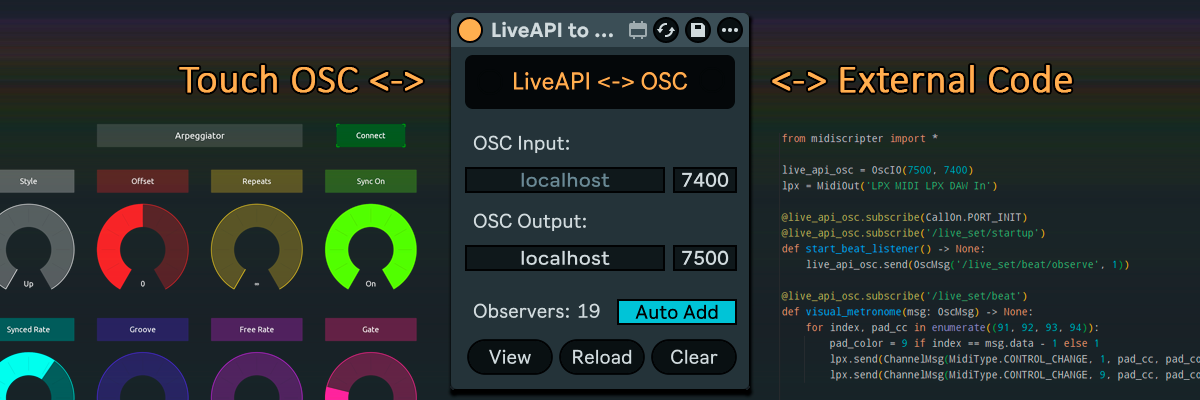
| Description: | This device exposes the whole LiveAPI as OSC addresses. You can map Live controls to TouchOSC or any other OSC app, get or set anything Max for Live can by OSC messages. How to Use - Find object's property or function path you want to use in Live Object Model documentation at "https://docs.cycling74.com/apiref/lom/". Put "/" at the beginning and replace spaces with "/" for its OSC address. "live_set tracks 0 mixer_device volume value" should become "/live_set/tracks/0/mixer_device/volume/value". - You can enable "Max for Live Developer Mode" in Live's "Options" menu and use "Copy Max for Live path" item in controls' context menus to get their addresses. - Send an OSC message with no arguments to get a property value. - Send an OSC message with an argument to set the property value. For easier parameter mapping you can use the parameter value scaling described below. - To call a function send an OSC message with an argument prepending the function name with "/call/". - You can also use "/id/31054/property" style addresses if you know the object's ID. The IDs are dynamic and should not be stored and used over multiple runs. Examples: /live_set/appointed_device/name - returns "blue hand" device name /live_set/midi_recording_quantization 2 - sets midi recording quantization to 1/8 /live_set/call/create_scene -1 - add the new scene after the last one and returns its ID Observing With "Auto Add" enabled, any OSC message adds an observer for the address if it's observable. Observed addresses are saved within the Live set. Use "View" button to view and edit the saved observers, press the "Reload" to apply changes. If you don't want to use "Auto Add" you can set observers manually. Add "/observe" to the address and send "1" argument to add and "0" argument to remove an observer. Example: /live_set/current_song_time/observe 1 - set an observer for current song time in beats Parameter value scaling Parameter "value" property units, minimum and maximum varies between parameters. To provide more stable mapping the device introduces "/scaled_value" parameter property which gets and sets parameter value as a floating-point number between 0 and 1 of the parameter’s range. Examples: /live_set/tracks/0/devices/0/parameters/1/scaled_value - gets the value of the second parameter of the first device on the first track as a floating-point number /live_set/tracks/0/devices/0/parameters/1/scaled_value 0.5 - set the parameter value to 0.5 of its range Address matching The device supports "*" matching for digit only address items. Examples: /live_set/tracks/*/name - gets comma separated list of all track names /live_set/tracks/*/devices/*/name - gets the list of all the top-level device names on all tracks /live_set/tracks/0/devices/*/parameters/0/value 0 - disables all the top-level devices on the first track Extra addresses and actions When device is loaded, it sends a message to "/live_set/startup" address. Use "/live_set/beat" address to get/observe the current beat number in measure. There are Max JS API actions you can add to an address: /children - returns object's children IDs /getcount - returns the number of the object's children /getstring - returns property of the object as a string /id - returns the object's ID /info - returns a description of the object, including id, type, children, properties and functions /path - returns the object's path /proptype - returns the type of the property or child /type - the object type The device is also hosted on GitHub with my other free devices: https://github.com/Maboroshy/Max-for-Live-Devices/ TouchOSC demo used in preview is also hosted there. Licensed under the GNU Lesser General Public License v3.0 (LGPL‑3.0). |
Details
| Live Version Used: | 12.0.5 |
| Max Version Used: | 9 |
| Date Added: | Jul 28 2026 16:51:27 |
| Date Last Updated: | Jul 28 2026 18:33:32 |
| Downloads: | 7 |
| ⓘ License: | None |
Average Rating
Log in to rate this device |
-n/a- |
Files
| Device File: | LiveAPI to OSC 1.0 by Maboroshy.amxd |
Login to comment on this device.
Browse the full library