Device Details
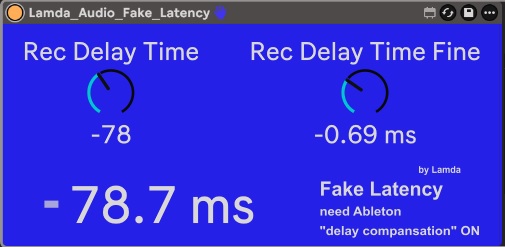
Overview
| Name | Version: | Lamda Fake Latency 0.92 |
| Author: | MrLamda |
| Device Type: | Audio Effect |
| Description: | This tool can manualy correct Recording Latency. If you get latency someware in your external recording chain (e.g. from hardware synthesizer) you can crrect it with this device. (it use the Ableton latency correction) This tool has the advantage over Ableton's onboard options that it can be saved in individual track templates (e.g., a template for recording a specific hardware synthesizer) or in an audio rack. Ableton itself always "forgets" the settings when loading or copying saved templates in its onboard settings. Instructions: Audio tracks must always be recorded via a second track (e.g., a hardware synthesizer inputs to track 1 (where the tool must be placed) and then sends the signal to track 2, where latency-corrected recording can then be performed). It only work if you switch the "delay compansation" ON (at the Ableton options) It is not possible to record latency-corrected audio on the same track as the device is placed. Note: This tool is designed for static use; dynamic modulation will result in dropouts. |
Details
| Live Version Used: | 12 |
| Max Version Used: | 9.0.10 |
| Date Added: | Mar 07 2026 18:30:10 |
| Date Last Updated: | Mar 14 2026 11:30:05 |
| Downloads: | 65 |
| ⓘ License: | AttributionNonCommercialShareAlike |
Average Rating
Log in to rate this device |
-n/a- |
Files
| Device File: | Lamda_Audio_Fake_Latency.amxd |
Comments
This audio tool works as planed, but it seems Ableton has changed the counting/solving of latency or the way it´s compensate recordings. So the recording process totaly ignoring the fake latency.
Some tests with the own tools "external audio" and "external instrument" let me conclude, Ableton is working on a solution for that latency problem. At the moment both tools are not working (they are not able to correct latency maniualy, they do something "switch" internal latency calculation, but results seems not "manipulateable")
Some tests with the own tools "external audio" and "external instrument" let me conclude, Ableton is working on a solution for that latency problem. At the moment both tools are not working (they are not able to correct latency maniualy, they do something "switch" internal latency calculation, but results seems not "manipulateable")
Posted on March 21 2026 by MrLamda |
Report Issue
Login to comment on this device.
Browse the full library
-the fake latency wasn´t update dynamicly from dial