Device Details
Overview
| Name | Version: | ClipBouncer 1.0 |
| Author: | mtfo |
| Device Type: | Audio Effect |
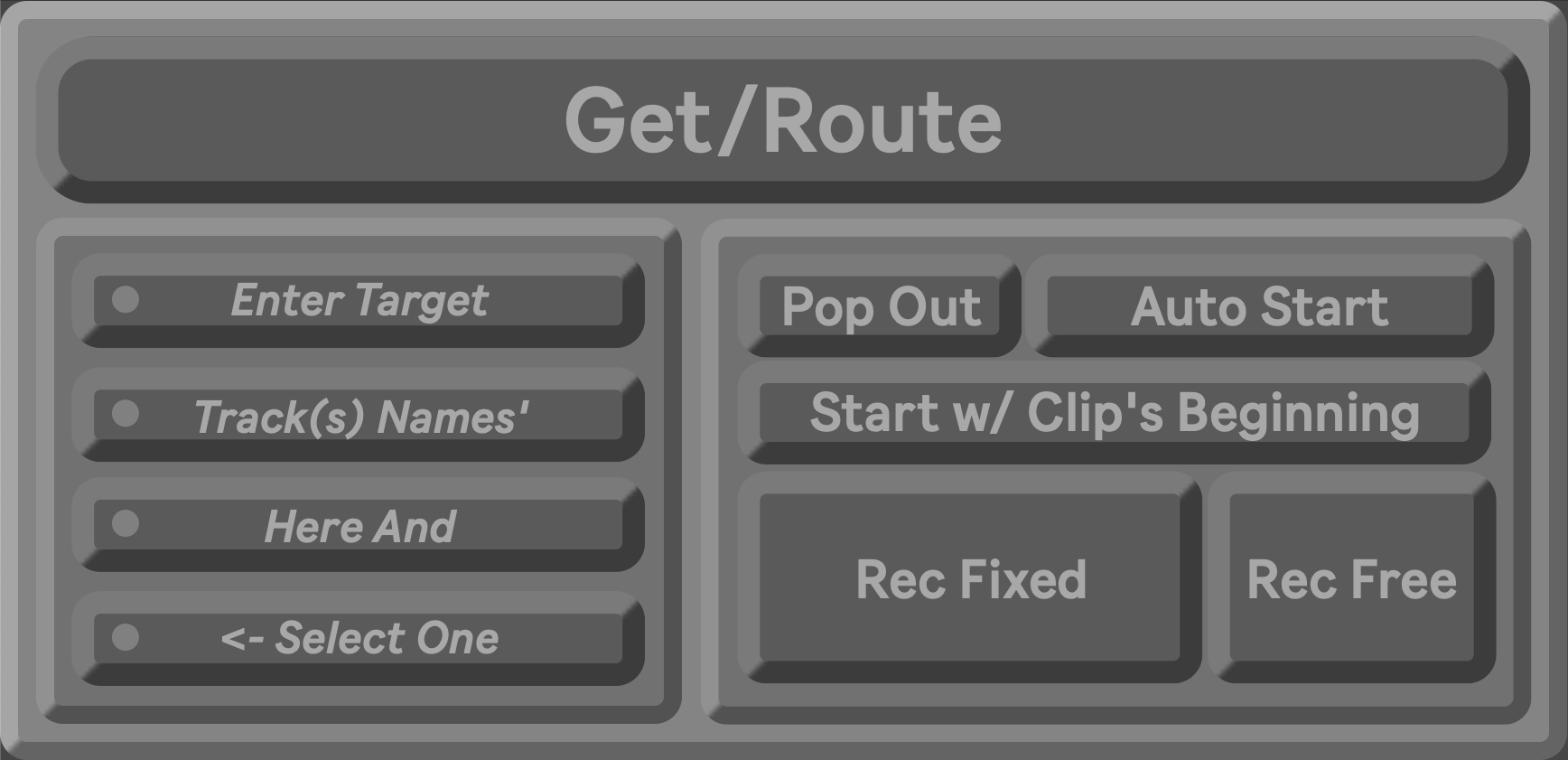
| Description: | ============================== CLIPBOUNCER ============================== What takes 5-10 manual steps happens in one click Save 30+ minutes per session of repetitive work ▸ Automates the entire multi-step bounce workflow: ◆ Capture clip info & mixer values ◆ Create/select destination track ◆ Route audio with post-FX preservation ◆ Sync recording to precise timing points ◆ Manage scenes automatically ◆ Prevent phase cancellation ▸ Perfect for producers bouncing multiple tracks per session. Works with any tempo, time signature, or clip length. ============================== KEY FEATURES ============================== ✓ Preserves mixer values automatically ◆ Volume, Pan, Send Levels ◆ Transfers to target track ◆ Automation lanes initialize instantly ✓ Phase-perfect alignment options ◆ Sync to clip's beginning for perfect phase alignment ◆ Or snap to global quantization grid ◆ Respects loop start, start marker, playback position ✓ Prevents accidental phase cancellation ◆ Automatically mutes original clip ◆ Eliminates phasing artifacts ◆ One less thing to remember ✓ Scene management built-in ◆ Automatically creates new scenes ◆ Copies playing clips to preserve context ◆ Skip tracks with [dontCopy] tag ◆ Never copies source/destination tracks ✓ Works with non-standard clip lengths ◆ 3.5 beats? 1.75 bars? No problem. ◆ Auto-adjusts quantization ◆ Always finds proper sync points ✓ Supports flexible & fixed recording modes ◆ REC FIXED: Records exact source length ◆ REC FREE: Record until you stop ◆ Choose based on your workflow ============================== CORE CONCEPT ============================== ▸ The Get/Route button performs three functions in one click: ◆ 1 GET: Captures clip length, mixer values (volume, pan, sends), track name, and time signature ◆ 2 ROUTE: Creates/targets track, sets audio routing (post-FX), and applies mixer values ◆ 3 RECORD: Initiates synchronized recording and writes automation envelopes ============================== TARGET TRACK SETUP ============================== ▸ Enter track names in the four text fields on the left. Only one track can be selected at a time ◆ No selection or unrecognized track → Creates new audio track ◆ Selected target track → Routes to that existing track ============================== START MODES ============================== ▸ START W/ (CLIP'S BEGINNING) ◆ Recording waits for original clip to return to start point. Perfect phase alignment. Accounts for loop start, start marker, and playback position ▸ START W/ (GLOBALLY QUANTIZED) ◆ Recording begins at next quantization boundary (1 Bar, 1/2, 1/4, 1/8, etc). Independent of clip position. Best for quick bounces or non-looping material ▸ AUTO START (ON) ◆ Waits for sync point ◆ Records for exactly one clip duration ◆ Stops automatically and writes automation ▸ AUTO START (OFF) ◆ Unlocks record buttons ◆ Arms track and routes audio ◆ Waits for user to start recording ▸ REC FIXED ◆ Records for exactly the source clip length, respects Sync Mode ▸ REC FREE ◆ Records until you press again, ignores clip sync, allows flexible lengths ============================== ADVANCED FEATURES ============================== ▸ MIXER AUTOMATION ◆ Transfers from source to destination track: ■ Volume (exact dB value) ■ Pan (L/R position) ■ Send Levels (all returns) ◆ Automation lanes initialize with source values ▸ CLIP NAMING ◆ Format: [Source Track Name] [Duration] [Time Signature] ◆ Examples: ■ "Drums 4 Bars (4/4)" ■ "Vocals 2 Bars 1/2 Beat (4/4)" ■ "Piano 3 Bars (7/8)" ◆ Bounced clips automatically receive matching time signature metadata ▸ SCENE MANAGEMENT ◆ Similar to Capture_Insert_Scene ◆ ClipBouncer automatically creates new scenes when targeting tracks with existing clips ◆ CAPTURE BEHAVIOR ■ Tracks ending with [dontCopy] are skipped ■ Clips on source/destination tracks are never copied ■ All other playing clips are copied to new scene AFTER the recording has finished ■ Example: "Drums [dontCopy]" will never be duplicated ▸ QUANTIZATION AUTO-ADJUSTMENT ◆ Clips with unusual lengths (3.5 beats, 1.75 bars) trigger automatic quantization adjustment to ensure proper sync points ▸ ORIGINAL CLIP MUTING ◆ Automatically mutes original clip after bounce to prevent phase cancellation. Outlet 2 sends clip ID to muteClip_js module ▸ POP OUT WINDOW ◆ Press to open floating presentation window with main controls. Stays on top while working elsewhere in Live ============================== TIPS & BEST PRACTICES ============================== ▸ Map Get/Route to MIDI controller for one-button bouncing ▸ Auto Start ON for rhythmic material, OFF for effects/improvisation ▸ Use [dontCopy] on any track to keep them independent ▸ Pre-create target tracks for repeatable workflows ============================== CREDITS & LICENSE ============================== ▸ Developer: Mike Fodor (mtfo) ▸ Version: 1.0 ▸ Last Updated: January 2026 ============================== |
Details
| Live Version Used: | 12.0.5 |
| Max Version Used: | 8.6.2 |
| Date Added: | Jan 25 2026 04:26:41 |
| Date Last Updated: | Jan 25 2026 04:26:59 |
| Downloads: | 0 |
| Website: | https://mtfodor.gumroad.com/l/ClipBouncer |
| ⓘ License: | None |
Average Rating
Log in to rate this device |
-n/a- |
Login to comment on this device.
Browse the full library