Device Details
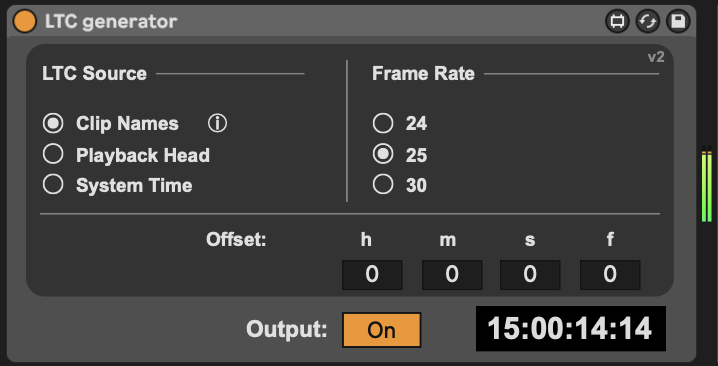
Overview
| Name | Version: | LTC Generator 2.0 |
| Author: | jensp |
| Device Type: | Instrument |
| Description: | This Max for Live device generates Linear Timecode (LTC) in real time inside Ableton Live, without the need for bulky pre-recorded LTC audio files. The generated timecode can be driven by: - Clips whose names specify timecode markers (for example: 2m15s, 5h, 15h25m30s15f) - The position of Live’s playback head - The system clock In modes 1 and 2, the device jams the timecode when playback starts and automatically retriggers whenever a jump in the timeline is detected. This guarantees a continuous and reliable LTC signal, even when looping or moving around in the Arrangement View. Important notes: - Because of Live API limitations, the device assumes a constant tempo while playing. BPM automation during playback is not supported. - For best results, set your audio buffer size between 32 and 128 samples. - Only non-drop-frame (NDF) frame rates are currently supported (29.97 fps is not yet available). |
Details
| Live Version Used: | 11.3.35 |
| Max Version Used: | 8.6.5 |
| Date Added: | Jan 21 2026 12:22:41 |
| Date Last Updated: | Jan 25 2026 15:47:04 |
| Downloads: | 352 |
| ⓘ License: | AttributionNonCommercialShareAlike |
Average Rating
Log in to rate this device |
-n/a- |
Files
| Device File: | LTC generator.amxd |
Comments
@braduro Thanks for the idea. I’ve added a warning when an offset is used in Playback Head mode. Sadly, there’s no reliable way to check the generated timecode against Live’s actual timeline time. The Live API only provides the playhead position in beats. Converting that to seconds requires assuming a fixed BPM up to that point, and BPM automation isn’t accessible from Max for Live. So there’s no way to accurately compare against Live’s timeline when tempo automation is involved.
Posted on January 26 2026 by jensp |
Report Issue
Login to comment on this device.
Browse the full library
As a fail safe, wouldn’t you want to have it conform to the Live TimeLine, at least when SMPTE is selected? Or at least hiccup with a red light or something, if they don’t match?
I could see why you’d want them independent, particularly if you were doing a pulldown or a telecine process, but I think this could weave a very tangled web if folks didn’t know that their sample rates and timeline didn’t match up