Device Details
Overview
| Name | Version: | ClipBouncer 1.0 |
| Author: | mtfo |
| Device Type: | MIDI Effect |
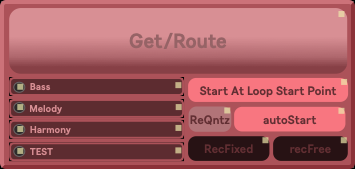
| Description: | This is my first attempt at sharing a MaxForLive Device. This is composed of mainly .js objects activated by the live buttons. I am not sure if the dependencies(.js code) actually uploaded with this device. So if you find yourself downloading this device, and are familiar with getting inside of max patches, let me know if the .js object are there and NOT greyed out. Also, happy bouncing. -First, map MIDI/Keyboard shortcuts to the buttons, mainly Get/Route, that is the main button. -Second, add the tracks' names you will bounce to into the text input. You can only select one track at a time. If none are selected (or if you press Get/Route the track you're on), then Get/Route will make a new track and bounce the audio to it. --------------------------------------------------------------------- In Ableton, when you press Get/Route, the clip you have selected will be bounced to your selected track or a new track. When AutoStart is on, Get/Route will automatically start the recording once the new/selected track are routed and ready. StartAtLoopPoint/StartGloballyQuantized - These are two modes that have to do with how the recording starts. When we start with "StartAtLoopPoint", the recording being bounced will wait until the start point of the looped clip,........ Im still writing the description..... but I have to go to work.... comment if you try. |
Details
| Live Version Used: | 12.3.2 |
| Max Version Used: | 9.0.9 |
| Date Added: | Jan 11 2026 04:44:24 |
| Date Last Updated: | Jan 14 2026 12:31:46 |
| Downloads: | 22 |
| ⓘ License: | None |
Average Rating
Log in to rate this device |
-n/a- |
Files
| Device File: | BouncerToo.amxd |
Login to comment on this device.
Browse the full library