Device Details
Overview
| Name | Version: | Quantum Dial for Ableton Delay and Echo and LFO 1.61 |
| Author: | MichalHo |
| Device Type: | Audio Effect |
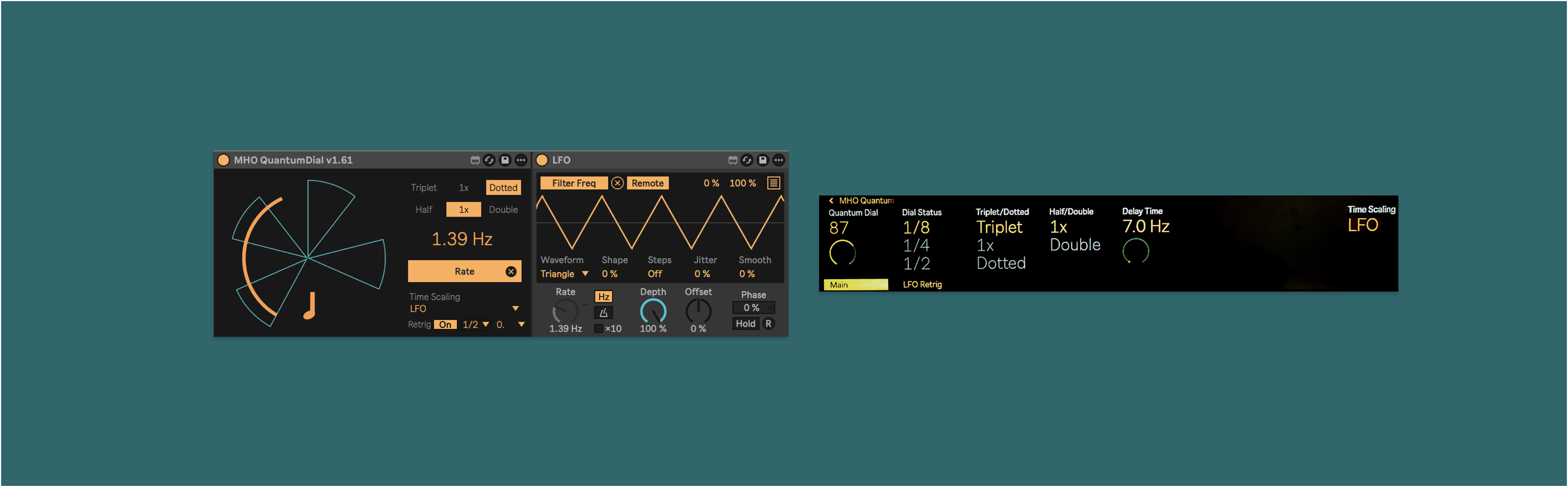
| Description: | Precision Control for Ableton Delay, Echo and LFO Version 1.61 tested with Live 12.4 / Push 2.4 / Maxforlive 9.1.4 Quantum Dial augments your control of the Ableton’s Delay, Echo and LFO effects by superimposing synchronized states onto their Time parameter (Rate for LFO). The dial is divided into eight alternating sectors: Half of the sectors permit all input, allowing dynamic, unsynchronized parameter modulation. The other four sectors lock the input into note-quantized values, keeping your delay perfectly in sync. This offers advantages during performance: Stay in sync, if improvisation takes you off course, simply return to a quantized sector to lock your timing back to tempo. Create rhythmic or even melodic variations by skipping between sectors, adding groove and unpredictability to your sequences or loops. Extended Delay Control The Delay Time Factoring Matrix (Triplet/Dotted, Half/Double) expands your creative options, making it easy to experiment with polyrhythms and unconventional delay patterns. LFO Augmentation The Retrigger toggle (On/Off), when set to “On”, resets the LFO waveform to Ableton’s grid. Choose the reset interval with Quantization (1/16 note to 32 bars) and the waveform’s offset with Phase (0, 25%, 50%, 75%). This section is hidden when in Delay or Echo mode. Push Standalone In standalone mode, you have control over all parameters. On the Main page’s left edge is the Quantum Dial. Dial Status shows you the current quantization rate, it is a passive display dependent on the Quantum Dial, it does not send out any values. The note length modifiers Triplet/Dotted and Half/Double transform the output of the Quantum Dial. Delay Time shows the effective output in ms or Hz, depending on Time Scaling. Time Scaling lets you set the output to either Delay, Echo or LFO, depending on which device you are controlling with Quantum Dial. On the LFO Retrig page, you will find the Retrigger toggle (On/Off), Quantization (1/16 note to 32 bars) and Phase (0, 25%, 50%, 75%). Setup 1. Insert the Quantum Dial anywhere, usually adjacent to the device you wish to control. 2. Map it to the Delay Time, Echo Time, or LFO Rate using the Map button. 3. Choose the appropriate mode from the Time Scaling menu. 4. (Optional) Assign an external MIDI controller or a Macro to the Quantum Dial. 5. For Push standalone: prepare your set by mapping Quantum Dial and LFO to their targets in desktop Live, then use “Collect and Save” for seamless standalone operation. Beginning with Live 12.4 and Push 2.4, you can map MIDI controllers on the Push itself, but you cannot map between Live devices. |
Details
| Live Version Used: | 12.4 |
| Max Version Used: | 9.1.4 |
| Date Added: | Mar 16 2025 13:09:43 |
| Date Last Updated: | May 08 2026 16:54:48 |
| Downloads: | 1 |
| Website: | https://michalho.gumroad.com/l/qjaov |
| ⓘ License: | Commercial |
Average Rating
Log in to rate this device |
-n/a- |
Login to comment on this device.
Browse the full library