Device Details
Overview
| Name | Version: | Trigger-Record 1.0 |
| Author: | isfopo |
| Device Type: | Audio Effect |
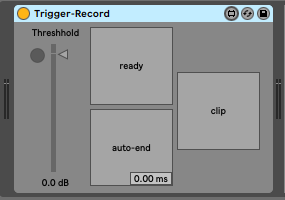
| Description: | An audio device that triggers Ableton's global record at a particular threshhold. Designed to emulate the trigger sampling feature of the Roland SP series that is helpful when recording your own drum samples. Set threshhold using the "Threshhold" fader, arm the tracks you want to record and press the "ready" button to arm this device. If you want to automatically stop the recording, you can press the "auto-end" button and set the amount of time you want the sample to be. The clip button will automatically record your clip into the currently selected clip when activated. When not activated, only the global record will be triggered. |
Details
| Live Version Used: | 10.0.1 |
| Max Version Used: | 8.1.0 |
| Date Added: | Nov 11 2019 03:24:17 |
| Date Last Updated: | No Updates |
| Downloads: | 294 |
| ⓘ License: | None |
Average Rating
Log in to rate this device |
-n/a- |
Files
| Device File: | Trigger-Record.amxd |
Comments
Can someone explain how to set this up? I want to trigger global record by using a midi clip, so that when the clip is played in my session, all armed tracks start recording.
Posted on February 24 2026 by daemingue |
Report Issue
Login to comment on this device.
Browse the full library