Device Details
Overview
| Name | Version: | Tuple 1.4 |
| Author: | c0re |
| Device Type: | MIDI Effect |
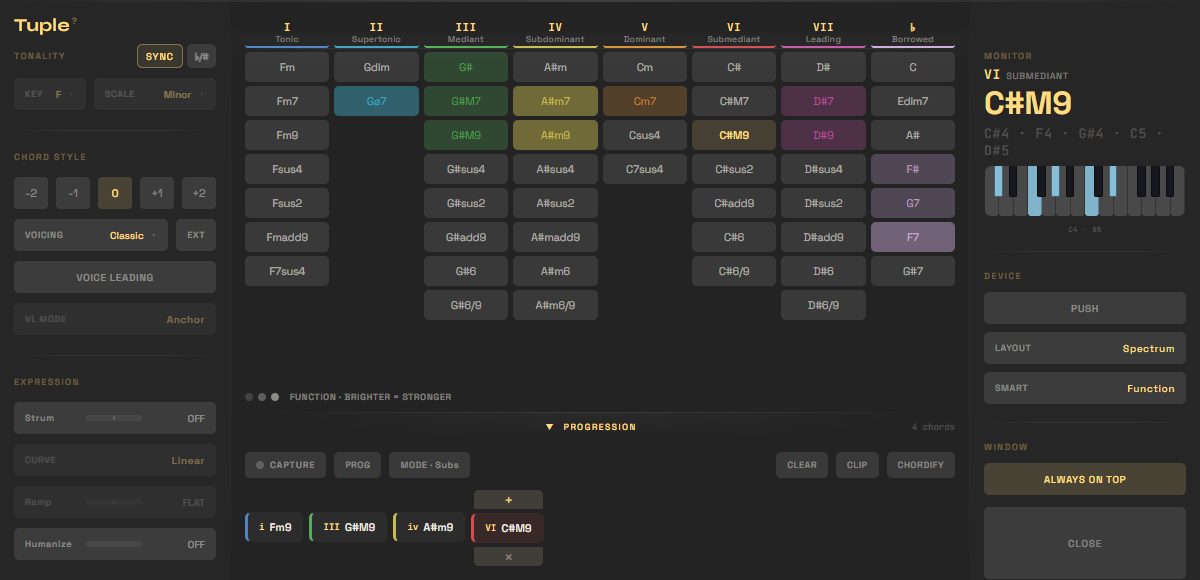
| Description: | Tuple — every chord in your key, on one grid, always visible. Tuple is a free, open-source Max for Live chord device. Drop it on a MIDI track and play harmony like a drum rack: every diatonic AND borrowed chord for your key sits on one grid, color-coded by degree. No menus, no popups, no theory headaches — pick a sound and play. WHAT'S ON THE GRID • 7 diatonic degrees + a dedicated Borrowed column (secondary dominants & modal interchange) — every valid chord always visible, never hidden behind a page. • All 12 keys + major, minor, the modes, harmonic & melodic minor, and pentatonics — switch and the whole grid re-voices. • Auto-sync — Tuple follows Live's key & scale automatically; toggle SYNC and it re-imports on every change (Key/Scale lock while it follows). • Flat / sharp toggle (♭/#) — read note names whichever way fits your key. • 5 color logics (spectrum, function, tension, fifths, quality) with an on-grid legend, so you can read it at a glance. PLAYABILITY • 28 voicings — Classic, Piano, Open, Spread, Drop 2/3, Rootless (+ A/B), Jazz, New Jazz, Quartal, Upper, Sus, House, Prog, Trance, Funk, Organ, French Touch, Broken, Deep Tech, Detroit, Soul, Clav, Rave, Wide, Power — each with its own ear-tested identity, from tight jazz to wide electronic textures. • One-hand grips — every voicing stays in a single register (only Piano spans two hands). • Voice leading — Anchor & Flow modes with common-tone detection for smooth changes. • Expression — Strum (up to ±250 ms, with curve & velocity ramp) and Humanize. WORKFLOW • Perform & Capture (CHORDIFY) — play one-note chord triggers live while Live records them, then click CHORDIFY and every trigger becomes its full voiced chord, voice-leading included. Timing, feel & note lengths are preserved — Live did the recording. Undo and CHORDIFY again with a different voicing anytime. • Progression → Clip — capture chords as you play, drag to re-order, then drop the whole progression into a MIDI clip, one chord per bar. • Push 2 — play the grid on the pads, color-coded by degree, plus a Progression mode: capture a progression and get each chord's substitutes, strongest next chords, and re-voicings right on the pads. • MIDI mapping — map 8 key controls to any controller, saved with your set. • Auto-updater — Tuple checks for new versions and updates you right inside Live (bigger updates launch the installer for you). • SMART CHORDS — As you play, Tuple lights up where to go next — by harmonic function (what resolves / builds tension) or by voice leading (what moves smoothest with your current voicing). Brighter = stronger. Suggestions, never rails — it works in every layout, on screen and on Push 2. NEW IN 1.4 • Perform & Capture (CHORDIFY) — play one-note chord triggers live while Live records them, then click CHORDIFY and every trigger becomes its full voiced chord, voice-leading included. Your timing & feel are preserved. • Push 2 — Progression mode: capture a progression and get each chord's substitutes, next chords & re-voicings right on the pads. • Hover-to-preview your progression in the drawer. IMPROVED • Reworked voicing engine — now 28 voicings, each with its own ear-tested identity (Nu-House → New Jazz, Jamiroquai → Clav, Trap removed). • Tighter Extended chords; smart suggestions now follow your progression; leaner engine under the hood. FIXES • Progression → Clip now works on recent Live 11/12 (could write an empty clip before). • Smoother macOS installer. REQUIREMENTS Ableton Live 11+ with Max for Live · macOS & Windows. FREE & OPEN SOURCE Site & manual: https://tuple.live/ Source: https://github.com/c0remusic/tuple Community: https://discord.gg/skn5Np6DdP Version 1.4.0 DOWNLOAD Visit the site https://tuple.live (maxforlive.com doesn't support zip), click download on the installer that fits your OS (or manually with the zip : extract everything in the same folder, drag the .amxd into a midi track.) |
Details
| Live Version Used: | 12.2.1 |
| Max Version Used: | 8.6.2 |
| Date Added: | Jun 15 2026 14:56:52 |
| Date Last Updated: | Jun 23 2026 14:33:53 |
| Downloads: | 177 |
| Website: | https://tuple.live |
| ⓘ License: | None |
Average Rating
(1) Log in to rate this device |
5 |
Files
| Device File: | tuple.zip |
Comments
great device, thank you! Just a heads up, in the manual you state the importance of the files remaining together, but it should also mention the main folder needs to be in your Ableton user library. At least, thats what i found to be true. Wouldn't load otherwise.
Posted on June 17 2026 by shinytheshiny |
Report Issue
Thanks, really glad you like it!
Interesting though — on my end it loads fine from anywhere, it doesn't need to be in the User Library. That said, I'm looking into making the device find its files more reliably so this stops happening at all. If you hit it again, knowing your OS + Live version would really help me track down the real reason. Cheers for the heads up!
Interesting though — on my end it loads fine from anywhere, it doesn't need to be in the User Library. That said, I'm looking into making the device find its files more reliably so this stops happening at all. If you hit it again, knowing your OS + Live version would really help me track down the real reason. Cheers for the heads up!
Posted on June 17 2026 by c0re |
Report Issue
Thanks. Very suitable for beginners.
But Version 1.2.2
Arm the track, hit record, not have perform the grid live. Select an empty clip slot in Live, then press CLIP. Nothing happened.
But Version 1.2.2
Arm the track, hit record, not have perform the grid live. Select an empty clip slot in Live, then press CLIP. Nothing happened.
Posted on June 18 2026 by orz |
Report Issue
If you want to record the progression you made to be able to use the function "CLIP", you need to use the "progression" window and CAPTURE what you've played. Then selecting an empty clip first, and press CLIP when you're satisfied with the progression. The whole workflow of recording is documented in the manual (https://tuple.live/manual/)
Posted on June 18 2026 by c0re |
Report Issue
Login to comment on this device.
Browse the full library