Device Details
Overview
| Name | Version: | NOTE BUDDY 1.0 |
| Author: | marcmalade |
| Device Type: | MIDI Effect |
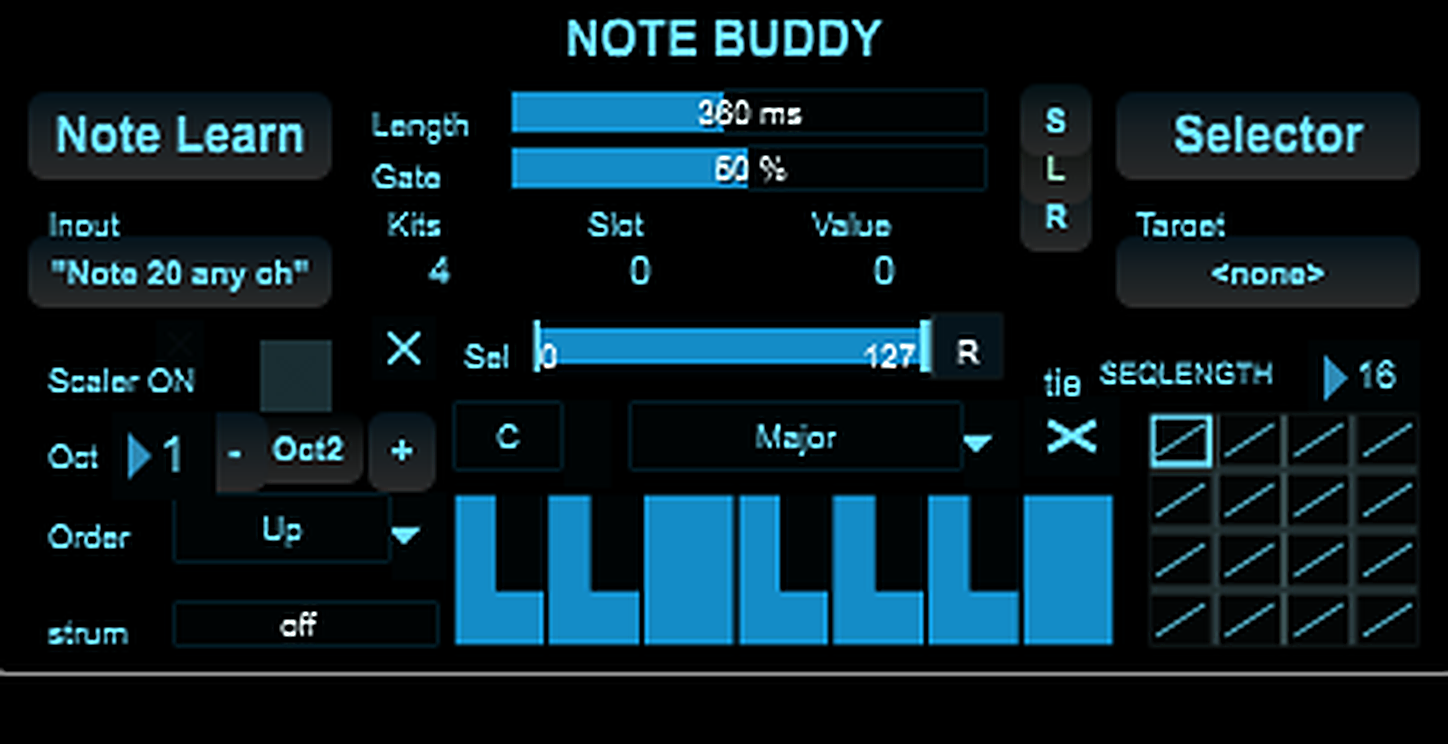
| Description: | NOTE BUDDY Advanced MIDI Trigger Sequencer & Harmonic Controller for Ableton Live / Max for Live NOTE BUDDY is a creative Max for Live MIDI device designed to turn a single MIDI trigger into a powerful musical and performance control source. Use one note, one pad, or one footswitch to generate chords, step through harmonic sequences, control Ableton Rack chains, switch kits, browse sounds, trigger progressions, or create evolving live-performance setups. Whether you are a drummer, producer, keyboardist, live performer, sound designer, or VJ, NOTE BUDDY gives you a compact way to transform simple MIDI input into structured musical or control output. What is NOTE BUDDY? NOTE BUDDY is not just a MIDI effect. It is a small performance brain for Ableton Live. It can: Learn an incoming MIDI note or CC Use that trigger to advance through values, slots or sequences Generate notes from scales Trigger chords from a single note Play 16-step melodic or harmonic sequences Control Ableton Rack Chain Selectors Switch drum kits, instrument layers or FX chains Create chord progressions from one pad or one key Add strum-like timing offsets to chords Map its output to useful live-performance destinations In short: one trigger in, many musical possibilities out. Main features MIDI Learn input Click Note Learn, play a note or trigger a MIDI source, and NOTE BUDDY remembers it. That trigger becomes the control input for the device. This makes NOTE BUDDY ideal for: Drum pads MIDI keyboards Footswitches Electronic drum modules Ableton clips External sequencers MIDI controllers Live performance rigs Ableton Rack Chain Selector control NOTE BUDDY can be mapped to an Ableton Rack Chain Selector, letting you move through different sounds or effects using a single MIDI trigger. Use it to step through: Drum kits Snare variations Instrument layers FX chains Sample banks Synth presets VJ clip selectors Performance scenes This is especially useful if you want one pad or footswitch to change sound without touching your mouse or controller knobs. Chord Trigger mode With Chord Trigger, NOTE BUDDY can turn one incoming note into a full chord. Instead of playing complex chord shapes manually, you can use a single trigger to generate harmonies based on the selected scale, octave range and voicing behavior. Useful for: Live electronic music One-person performances Fast songwriting Ambient music Synth-pop Generative harmony Keyboard-lite performance setups Add Strum to spread the chord notes in time for a more human, guitar-like or arpeggiated feel. 16-step Sequence mode NOTE BUDDY includes a 16-step sequence grid for melodic and harmonic programming. Each step can hold note content, allowing you to build short patterns, progressions or structured musical phrases. You can use Sequence mode to: Trigger a 16-chord progression from one note Build melodic loops Advance through harmonic steps with a pad Create live chord changes without keyboard technique Use a footswitch to move through song sections Program compact performance sequences This is perfect for performers who want harmonic control without needing both hands on a keyboard. ORDER modes The ORDER control changes how NOTE BUDDY moves through notes or voices. In traditional scale modes, ORDER defines how repeated triggers move through the available notes: Up Down UpDown DownUp Converge Diverge Random modes Pinky / Thumb-style behaviors Chord Trigger In Sequence mode, ORDER becomes a voicing engine. It changes how the notes stored inside a step are distributed, inverted or emphasized. This lets you reshape the same notes into different musical feels without rewriting the sequence. Scale and User note editing NOTE BUDDY includes scale-based behavior and a mini keyboard for editing note content. Use it to: Work inside a selected scale Create custom user scales Define notes for sequence steps Build simple or complex harmonic material Control which notes are allowed to play This makes NOTE BUDDY useful both as a live-performance tool and as a compact compositional device. Strum control The Strum parameter spreads chord notes over time. Use subtle settings for natural human timing, or stronger settings for more obvious rhythmic gestures. Great for: Chord stabs Guitar-like rolls Arpeggiated hits Organic voicings Live performance movement Less robotic MIDI chords Who is NOTE BUDDY for? Drummers If you are a drummer using Ableton Live, NOTE BUDDY lets you use one pad to move through multiple drum kits, sample chains or articulations. Example: Hit one pad repeatedly to cycle through: Acoustic kit Electronic kit Percussion kit Distorted kit Special FX kit You can also use NOTE BUDDY to rotate snare variations, cymbal layers or percussion samples without changing your playing layout. Producers Use NOTE BUDDY to quickly explore sounds, build chord progressions, switch racks or add harmonic ideas without stopping your workflow. It is especially useful for: Sound design sessions Drum Rack experiments Instrument Rack browsing MIDI sketching Chord progression drafting FX chain switching Generative arrangement ideas Keyboardists and musicians NOTE BUDDY can help you trigger chord progressions from one note or one controller button. You can program a 16-step chord sequence, then advance through it with a single trigger. This is useful when: You want to focus on singing or playing another instrument You need simple live harmony control You want to trigger progressions hands-free You want to create song sections quickly You want complex harmony without complex fingerings Live performers NOTE BUDDY is built for performance situations where speed and reliability matter. You can prepare mappings and use one simple trigger to control complex changes in your Live Set. Possible uses: Switch sounds during a song Step through FX chains Control backing harmonies Trigger chord movement Change rack layers Move through performance sections Create variation without adding more controllers VJs and multimedia performers NOTE BUDDY can also be used as a MIDI control tool for visual performance. Map its output to visual parameters, clip selectors or effects in your VJ setup. Use one MIDI trigger to: Step through visual clips Change video FX chains Trigger visual states Control media selectors Sync visual changes with musical performance It is not limited to notes. It can also become a compact performance controller. Example use cases One pad, multiple drum kits Map NOTE BUDDY to an Ableton Drum Rack Chain Selector. Each hit advances to a different kit. Great for live drummers, hybrid drum setups and electronic performance. One note, full chord Enable Chord Trigger, select a scale, adjust octave and strum, then play one note. NOTE BUDDY outputs a full chord based on your settings. Ideal for fast songwriting or minimal live setups. One trigger, 16 chords Set NOTE BUDDY to Sequence mode. Enter a chord on each step of the 16-step grid. Trigger one MIDI note repeatedly to advance through the full progression. Perfect for live chord progressions controlled by a pad or footswitch. FX chain browsing Map NOTE BUDDY to an Audio Effect Rack Chain Selector. Each trigger moves to a new FX chain: Clean Delay Distortion Filter Glitch Reverb Granular Lo-fi Useful for live transitions and sound design. VJ clip switching Map NOTE BUDDY’s output to a video clip selector or visual effect parameter. Each trigger advances to another visual state, making it useful for music-synced video performance. Why use NOTE BUDDY? Because sometimes one MIDI note should do more than just play one note. NOTE BUDDY lets you build small performance systems inside Ableton Live without complicated routing. It gives you a fast, musical and flexible way to transform simple triggers into meaningful musical or control events. It is designed for people who want to perform, experiment and create without constantly touching the mouse. Key benefits Saves controller space Turns one trigger into many actions Makes chord progressions easier to perform Works well with Ableton Racks Helps build live-friendly setups Useful for musicians and visual performers Encourages creative MIDI routing Great for live improvisation Makes complex changes feel playable Compact and performance-oriented Requirements Ableton Live Max for Live A MIDI track Optional: MIDI controller, pad controller, footswitch, drum module or external sequencer Included NOTE BUDDY Max for Live device English PDF manual Quick Start section Detailed use-case examples Support Created by Arthur Lombard. For support, feedback or questions: lombard.art@proton.me |
Details
| Live Version Used: | 12.0.5 |
| Max Version Used: | 8.6.2 |
| Date Added: | May 11 2026 21:00:32 |
| Date Last Updated: | No Updates |
| Downloads: | 0 |
| Website: | https://arthurlombard.gumroad.com/l/note_buddy |
| ⓘ License: | Commercial |
Average Rating
Log in to rate this device |
-n/a- |
Login to comment on this device.
Browse the full library